

Hello everyone, I'm Achao! Today I'm introducing an AI tool that really caught my eye—exo. This project has already garnered over 30.5k stars on GitHub, making it one of the hottest AI projects around lately!
What is EXO?
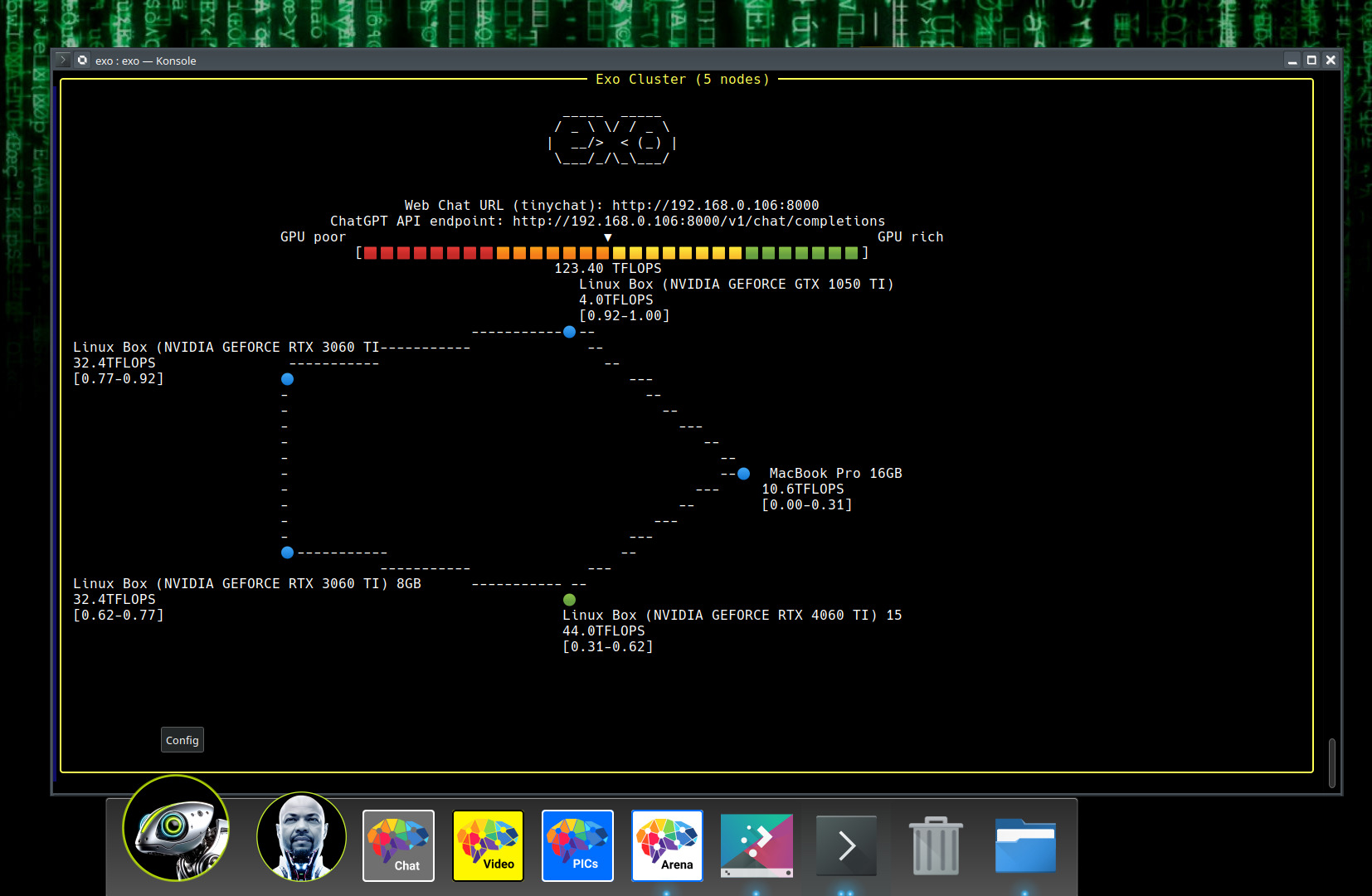
In short,EXO is an open-source framework that enables you to build AI clusters using various devices at home.Imagine connecting your iPhone, iPad, MacBook, Android phone, and even your Raspberry Pi to form a super-powerful AI computing cluster! Doesn't that sound like something straight out of science fiction? But exo has actually made it happen.
Core Functionality Highlights
🚀 Device Aggregation Tool
The most impressive thing about EXO is that it canAutomatically discover and integrate various devicesYou don't need to perform complex configurations; simply run it on each device.exoUpon command, they will automatically locate each other and form a unified AI computing resource pool.
🧠 AI Model Segmentation
EXO adoptsDynamic Model Segmentation TechnologyIt intelligently distributes different layers of the model based on each device's hardware capabilities (memory, GPU performance, etc.). This means you can run models larger than the memory capacity of any single device!
🔄 Support for multiple inference engines
- MLXAn engine specifically optimized for Apple Silicon
- tinygradLightweight yet highly efficient inference engine
- PyTorch(Under development)
- llama.cpp(Under development)
🌐 Multiple network discovery methods
- UDP Auto-Discovery
- Manual Configuration
- Tailscale Network
- Bluetooth and Radio (Under Development)
Installation and use are super simple.
Hardware Requirements
Honestly, EXO's requirements are really reasonable!As long as the total memory of all devices can accommodate the entire model.For example:
- 2 MacBook Airs with M3 chip and 8GB of RAM
- 1 NVIDIA RTX 4070 Ti laptop with 16GB of memory
- 2 Raspberry Pi units with 4GB RAM + 1 Mac Mini with 8GB RAM
Installation steps
git clone https://github.com/exo-explore/exo.gitcd exopip install -e .# or use venvsource install.sh
Usage
So simple it's outrageous:
<BASH># on Device 1exo# on Device 2 exo
That's it! The two devices will connect automatically, and then you can http://localhost:52415 Access the ChatGPT-style web interface.
Practical application scenarios
🏠 Home AI Assistant
Put your unused old phones, tablets, and computers to work by building a private AI assistant—protecting your privacy while saving money.
👨💻 Developer Testing
Want to test large models but lack the hardware? Use exo to combine multiple devices and run massive models like Llama 3.1 405B!
🎓 Education and Learning
Students can assemble several inexpensive devices to train AI models, significantly reducing costs.
Technical Advantages
Peer-to-Peer Network Architecture
EXO is not a traditional master-slave architecture, but ratherTrue peer-to-peer networkEvery device is equal; as long as it is connected to the network, it can participate in the computation.
Heterogeneous Device Support
Devices from different brands, systems, and hardware can work together seamlessly—this level of compatibility is truly powerful.
ChatGPT Compatible API
We provide a fully compatible API interface with OpenAI. Your existing application only needs to change one line of code to switch to running on your own hardware.
Experience
After conducting actual tests, Achao discovered that exo'sThe auto-discovery feature is indeed quite smart.Connections between devices require almost no manual intervention. In terms of performance, while some degradation may occur with heterogeneous devices, the ability to run ultra-large models remains a compelling advantage.
However, it should be noted that EXO is currently stillExperimental softwareYou may encounter some bugs. However, the development team is highly responsive, and the community is very active.
Fits the crowd
- AI enthusiastsUsers who want to experience large models but have limited hardware
- Privacy advocateUsers who wish to run AI models on their own devices
- developersDevelopers who need to test model performance across different hardware configurations
- educational organizationSchools with limited budgets but interested in implementing AI education
summarize
EXO is truly an innovative project! It breaks the conventional notion that ”expensive hardware is required to utilize AI,” allowing ordinary people to experience the power of large models using existing devices. Although still in its early stages, it holds tremendous potential for growth.
If you have a few idle devices at home, why not give exo a try? Experience the magic of turning your phone, tablet, and computer into an AI supercomputer!
Official website link: https://github.com/exo-explore/exo
bywordexo, AI cluster, distributed inference, device aggregation, model partitioning, open-source AI, home AI
