

Hello everyone, I'm Achao! Today I'd like to introduce a database visualization tool that really caught my eye—ChartDB. As a developer who frequently works with databases, I've found this tool significantly boosts productivity, and it's completely free and open-source!
What is ChartDB?
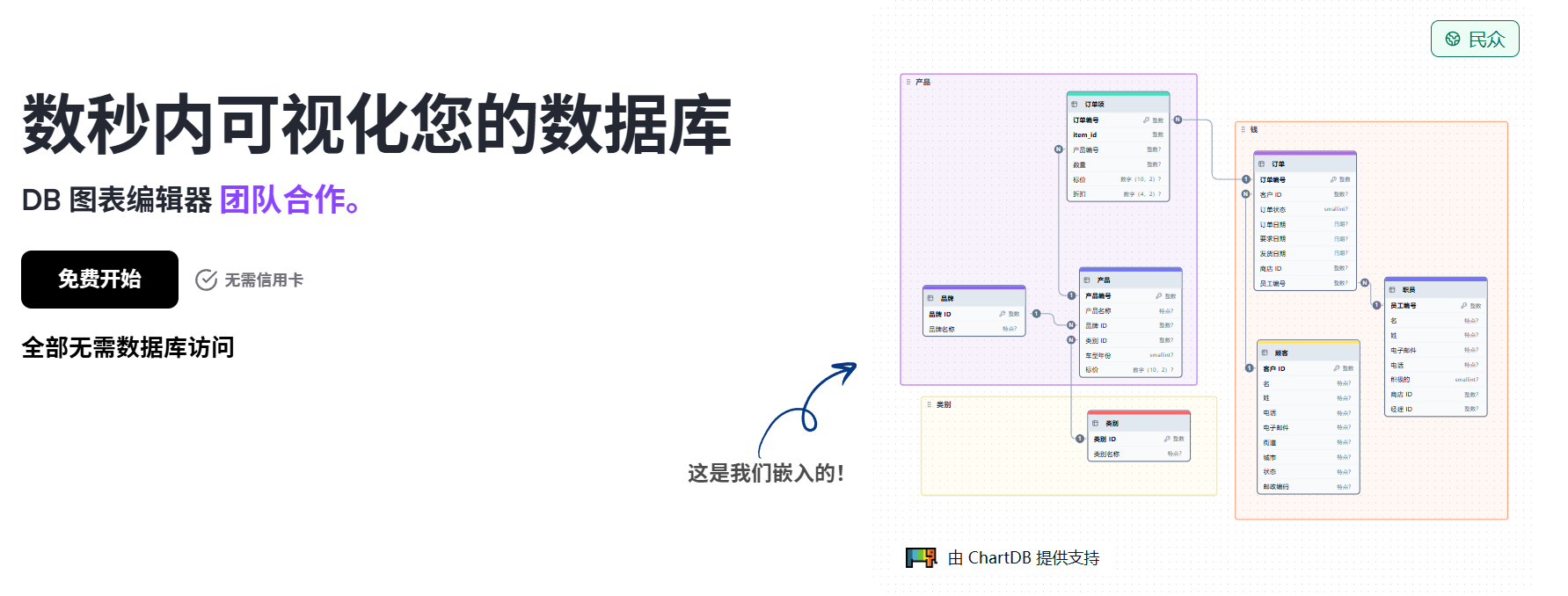
ChartDB is a free, open-source web-based database visualization tool. Simply put, it's a tool that lets you ”see” your database structure. Imagine this: with just one query, you can transform complex database table relationships into clear diagrams. Isn't that amazing?
Key Feature Highlights
🚀 One-Click Smart Import
The most surprising feature of ChartDB is its intelligent query import. You don't need to install any client software or worry about leaking database passwords. Simply run a simple query on the web to import the database schema in JSON format, and it automatically generates a professional ER diagram (Entity-Relationship diagram).
The supported database types are quite extensive:
- MySQL, MariaDB
- PostgreSQL
- Microsoft SQL Server
- SQLite
- ClickHouse
🤖 AI-Driven Deadline Export
This feature is incredibly useful! ChartDB integrates AI technology to automatically generate DDL (Data Definition Language) scripts for target databases. For example, if you want to migrate a MySQL table structure to PostgreSQL, it can automatically generate the corresponding table creation statements, significantly simplifying the database migration process.
🎨 Export in multiple formats
The generated database charts can be exported in multiple formats:
- PNG: Suitable for document insertion
- JPG: A widely used image format
- SVG: Vector format, maintains quality when zoomed
💻 Zero-configuration usage
As a web-based tool, ChartDB's greatest advantage is its out-of-the-box usability. You don't need to install any software—just open your browser and start working. It's particularly well-suited for team collaboration and rapid prototyping.
Who is it suitable for?
Based on my experience using ChartDB, it is particularly well-suited for the following groups:
👨💻 Database Developer
- Need to quickly understand the existing database structure
- Perform database design and restructuring
- Prepare a database migration plan
👩🏫 System Architect
- Designing the Database Architecture for the System
- Demonstrate database relationships to team members
- Prepare technical documentation
🎓 Students studying databases
- Visualizing Database Concepts for Learning
- Practice Database Design
- Understanding Table Relationships and Foreign Key Constraints
👨💼 Project Manager and Technical Lead
- Quick Overview of Project Database Structure
- Assess the feasibility of technical solutions
- Conduct a technical review
User Experience Sharing
To be honest, I was immediately impressed by ChartDB's simplicity the first time I used it. The entire process went like this:
- Open the websiteVisit app.chartdb.io
- Select Database TypeFor example, MySQL
- Run Smart QueryCopy and paste the provided query statement.
- Import Data StructureThe system automatically parses and generates charts.
- Edit and ExportYou can adjust the layout and then export it to the desired format.
The entire process may only take a few minutes, yet the results are highly professional. Especially for complex databases, being able to visually see the relationships between tables can truly prevent many design errors.
Summary of Advantages
- Completely free and open-sourceDon't worry about the cost.
- Zero-configuration usageOpen the webpage and you're ready to go.
- Supports multiple databasesCoverage of mainstream database types
- AI-Powered AssistantSimplify Database Migration
- Rich export formats:Meet the needs of different scenarios
- Teamwork-friendlyNo installation required—just share the link.
Some usage suggestions
Although ChartDB is very useful, based on my experience, I'd like to share a few suggestions with everyone:
- data securityAlthough no database password is required, it is still recommended to use one in the test environment.
- Network RequirementsSince it's a web-based tool, a stable internet connection is required.
- Browser CompatibilityWe recommend using modern browsers such as Chrome or Firefox.
- Data volume considerationsFor exceptionally large databases, batch processing may be required.
summarize
Overall, ChartDB is a powerful and user-friendly database visualization tool. It perfectly addresses the pain point of ”difficult-to-understand database structures,” making database design and maintenance more intuitive and efficient.
Whether you're an individual developer or working in a team, ChartDB can be a tremendous asset. Its free and open-source nature, in particular, ensures every developer can access professional database visualization services.
If you're also struggling with visualizing database structures, why not give ChartDB a try? It's sure to bring a pleasant surprise to your work!
—–
bywordChartDB, database visualization, ER diagrams, database design, open-source tools, AI-assisted, database migration
- ¥Download for freeDownload after commentDownload after login
- {{attr.name}}:
