

Hello everyone, I'm Achao! Today I'm introducing a particularly useful tool in the field of computer vision—Roboflow SupervisionTo be honest, the first time I encountered this tool, I was genuinely impressed by its design philosophy. Unlike those complex deep learning frameworks, it focuses on solving the ”little annoyances” we encounter in real-world projects.
Introduction: Your Computer Vision Toolbox
In short, Roboflow Supervision is aPython Toolkit, dedicated to providing a wide range of practical utility functions for computer vision projects. Its slogan, ”We write your reusable computer vision tools,” truly hits the nail on the head!
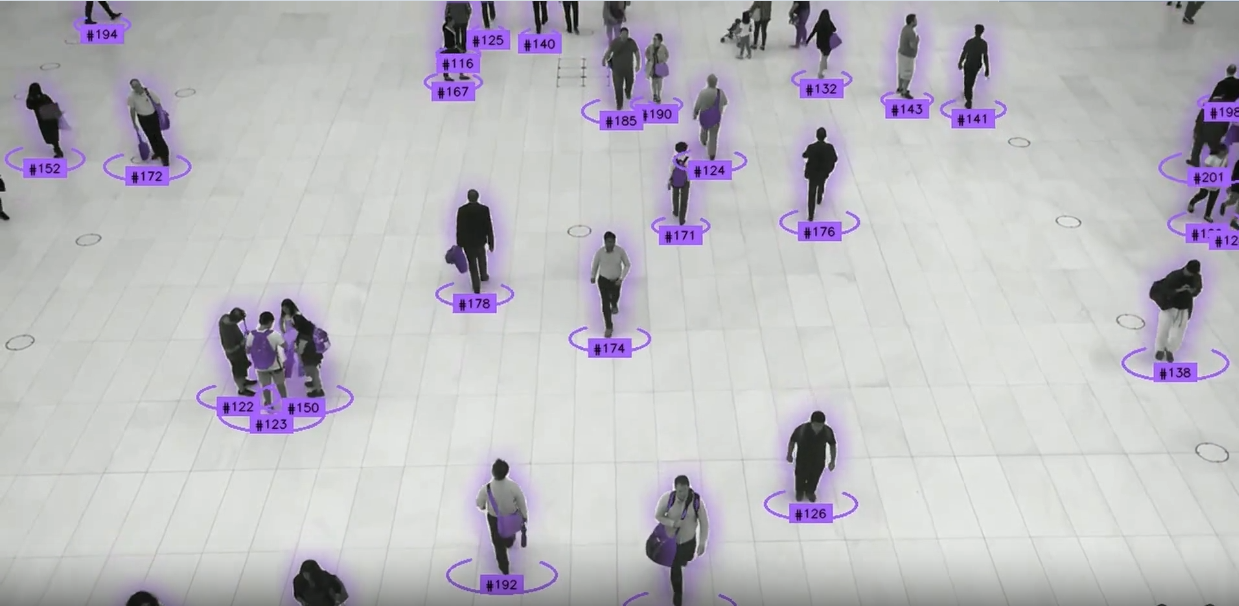
Think about it: when working on projects like object detection and image segmentation, don't we often end up writing repetitive code? Tasks like drawing detection boxes, formatting datasets, and calculating various metrics—while not complex, they're incredibly tedious. Supervision is here to solve these problems for you.
Key Features:
1. Standardized Data Format Processing
This is one of the most practical features I've found! Supervision provides asv.DetectionsClass, which can aggregate the results output by various different models.Unify into a standard formatWhether it's YOLO, Transformers, MMDetection, or any other model, they can all be easily converted.
import supervision as sv from ultralytics import YOLO# using YOLO detectionmodel = YOLO("yolov8s.pt") result = model(image)[0] detections = sv.Detections.from_ultralytics(result)# or use Transformersdetections = sv.Detections.from_transformers(transformers_results)This way, you won't have to write different post-processing code for each model—how convenient!
2. Comprehensive annotation tools
Supervision provides a variety of annotators that allow you to easily draw detection results on images:
- BoxAnnotatorDrawing bounding boxes
- LabelAnnotatorAdd labels and confidence scores
- MaskAnnotatorDrawing a segmentation mask
- HeatMapAnnotatorGenerate heatmap
Moreover, these annotation tools support a high degree of customization, allowing you to adjust colors, fonts, sizes, and more.
3. Dataset Management
Processing datasets is one of the most challenging aspects of computer vision projects. Supervision provides a complete solution:
<PYTHON># Loading Datasets in Different Formatsdataset = sv.DetectionDataset.from_coco(...) dataset = sv.DetectionDataset.from_yolo(...) dataset = sv.DetectionDataset.from_pascal_voc(...)# Split Datasettrain_dataset, test_dataset = dataset.split(split_ratio=0.7)# Merged Datasetmerged_dataset = sv.DetectionDataset.merge([dataset1, dataset2])# Format Conversiondataset.as_yolo(...) dataset.as_coco(...)
4. Utility Functions
Supervision also includes many handy little tools:
- Regional CountCount the number of objects within a specific area
- Line Crossing DetectionDetect whether an object has crossed a line
- Tracking IntegrationSeamlessly integrates with various trackers
- Video ProcessingSimplify the video frame processing workflow
Who Should Use Supervision?
1. Beginners in Computer Vision
If you're just getting started with computer vision, Supervision can save you a lot of time writing foundational code. You won't have to build those tedious utility functions from scratch, allowing you to focus more on the model itself.
2. Rapid Prototyping Developer
When you need to quickly validate an idea, Supervision's suite of tools lets you build a complete processing workflow in minutes. This is especially useful for competitions or proof-of-concept projects.
3. Production Environment Developer
Even in production environments, Supervision delivers stable and reliable utility functions. Its code quality is exceptionally high, having been rigorously tested across numerous real-world projects.
4. Researchers
Researchers often need to handle diverse datasets and models. Supervision's unified interface allows you to seamlessly switch between different experiments.
Installation and Use: Simple as pie
Installing Supervision requires just one command:
pip install supervision
Then you can start using it:
import cv2 import supervision as sv from ultralytics import YOLO# Load Imageimage = cv2.imread("your_image.jpg")# using YOLO detectionmodel = YOLO("yolov8s.pt") results = model(image)[0]Convert # to a unified formatdetections = sv.Detections.from_ultralytics(results)# Plotting Resultsbox_annotator = sv.BoxAnnotator() annotated_image = box_annotator.annotate(scene=image.copy(), detections=detections)# Save Resultscv2.imwrite("result.jpg", annotated_image)Advantages and Disadvantages
Advantages:
- Unified InterfaceAll models, all formats—one interface handles it all.
- Comprehensive functionalityFrom data processing to result visualization, everything you need is here.
- Documentation ImprovementThe official documentation is exceptionally detailed and includes numerous examples.
- Community EngagementWith 36,000 stars on GitHub, it shows that many people are using it.
- continuous updatingThe project is well-maintained, with new features constantly being added.
Shortcomings:
- Learning curveAlthough powerful, it requires time to become familiar with various APIs.
- Highly dependentTo support various features, it relies on a large number of packages.
- FlexibilityFor some highly customized requirements, you may still need to write your own code.
Summary: A tool worth trying
Overall, Roboflow Supervision stands as one of the most practical computer vision toolkits I've encountered. Unlike those large, all-encompassing deep learning frameworks, it focuses squarely on solving the pain points encountered in real-world development.
If you frequently work on computer vision projects, especially tasks like object detection and image segmentation, I strongly recommend giving Supervision a try. It can save you a significant amount of time, allowing you to focus more on developing core algorithms.
Moreover, this project is fully open-source under the MIT license, allowing you to use it confidently in commercial projects. The community is also highly active, ensuring you can get help quickly when encountering issues.
- ¥Download for freeDownload after commentDownload after login
- {{attr.name}}:
